


Techlicious Got 2,177 Entrants From One Chromebook
Techlicious gave a Lenovo Chromebook to its family tech readers. 2,177 Entrants came from 4,998 Impressions, a 43.56% Conversion Rate.
Author

Charlotte Czarnota

United Kingdom
Content Marketer
Products Used
Integrations Used

Date of Publication
13 Days, 2,177 Entrants
Figures from Gleam's report on the Lenovo Flex 5i Chromebook Plus Giveaway, which ended June 14, 2025. Conversion Rate is 2,177 Entrants out of 4,998 Impressions.
"
"People would rather win a less expensive product they actually need than an expensive product that sits on a shelf. We've added tens of thousands of subscribers to our email list through Gleam campaigns, by far the most cost-effective way for us to acquire subscribers at scale."
Josh Kirschner
Founder and CEO, Techlicious
Over 13 days ending June 14, 2025, Techlicious gave away one Lenovo Flex 5i Chromebook Plus on Gleam Competitions. 2,177 of the 4,998 people who saw the widget entered, and 2,158 of them ended up on Techlicious's Mailchimp list.
Techlicious has run 74 Gleam campaigns in 11 years, and the rule behind its prizes hasn't changed. Pick something at the price its readers actually shop at, rather than a top-shelf prize that seems out of reach.
A $599.99 Prize Readers Already Research
The Lenovo Flex 5i Chromebook Plus sits in the same world as Techlicious's Family and Parenting coverage (parental controls, school technology, student devices, practical household tech). A 2-in-1 Chromebook is the device a parent compares for homework, a student uses every day or a household shares. It's a prize readers already had a use for at home.
A premium gadget has broad appeal, so it also attracts people who only want the prize. Techlicious avoided that by putting the prize in the same territory its readers already come to the site for. As founder and CEO Josh Kirschner puts it, "People would rather win a less expensive product they actually need than an expensive product that sits on a shelf."

Techlicious ran the giveaway for 13 days with one winner. 2,177 of the 4,998 people who saw the widget entered, a 43.56% Conversion Rate.
One Required Action, 2,159 Opt-Ins
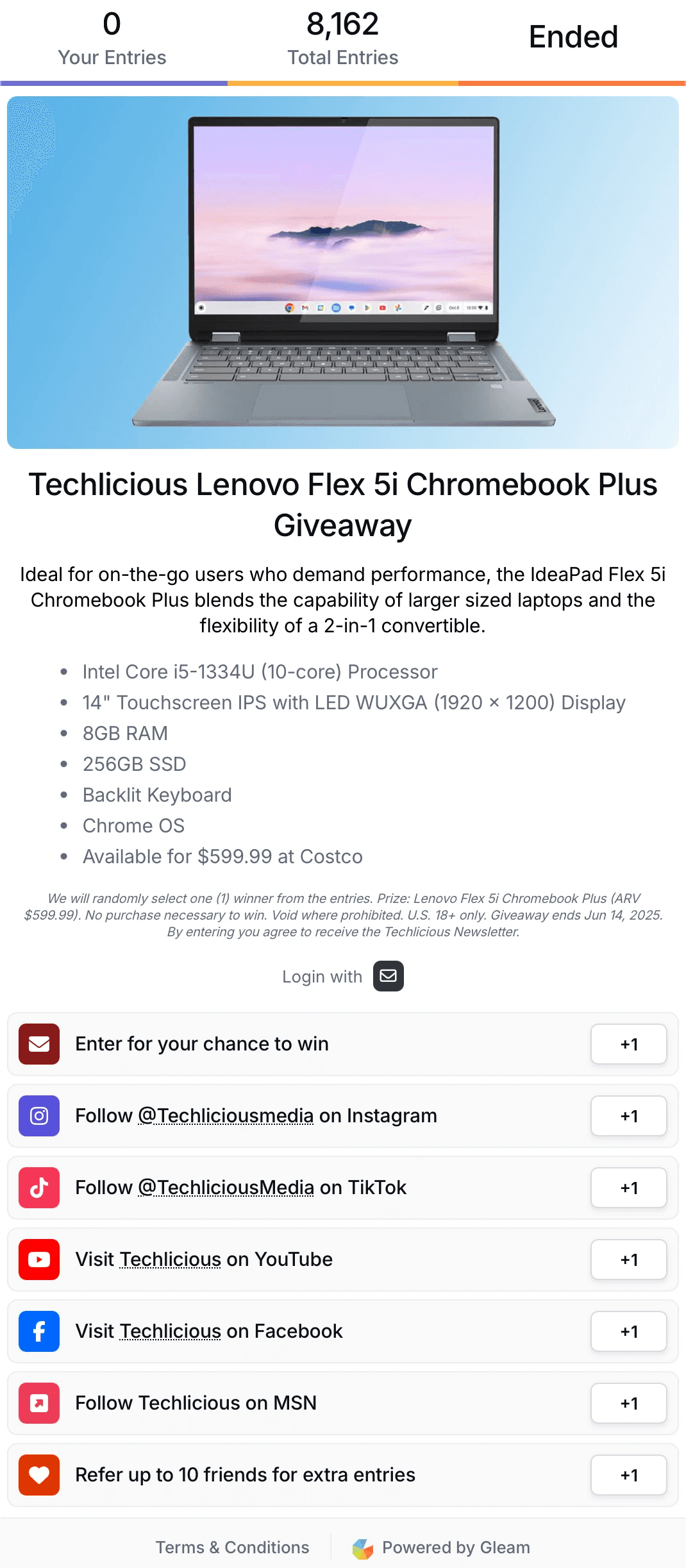
List growth was the goal, so Techlicious made one Action mandatory, Gleam's email opt-in Action, labeled "Enter for your chance to win". Entrants had to subscribe before they could do anything else. The other six Actions were optional and pointed at Techlicious's social channels, the secondary goal.
When the prize is something people want, they hand over their email address. 2,159 of the 2,177 Entrants completed the opt-in. The other 18 started an entry and never finished that step.
From Gleam to Mailchimp
Those subscribers didn't stay in the Gleam dashboard once the draw closed. Techlicious syncs Entrants into its own Mailchimp list through Gleam's Mailchimp integration, where the editorial team reaches them the same way as any other subscriber.
Only one person won the Chromebook. 2,158 contacts reached the Mailchimp list, and from there the aim is to turn them into regular readers through email.
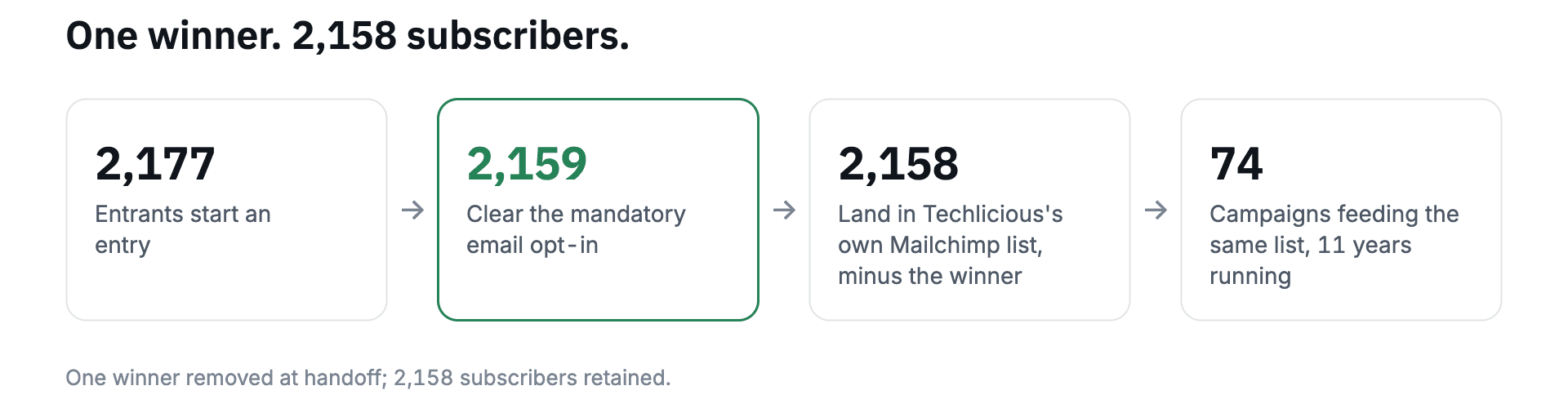
Put the email opt-in at the front of your widget and connect Mailchimp before you launch. Build your competition for free.
Seven Actions, 7,871 Completions
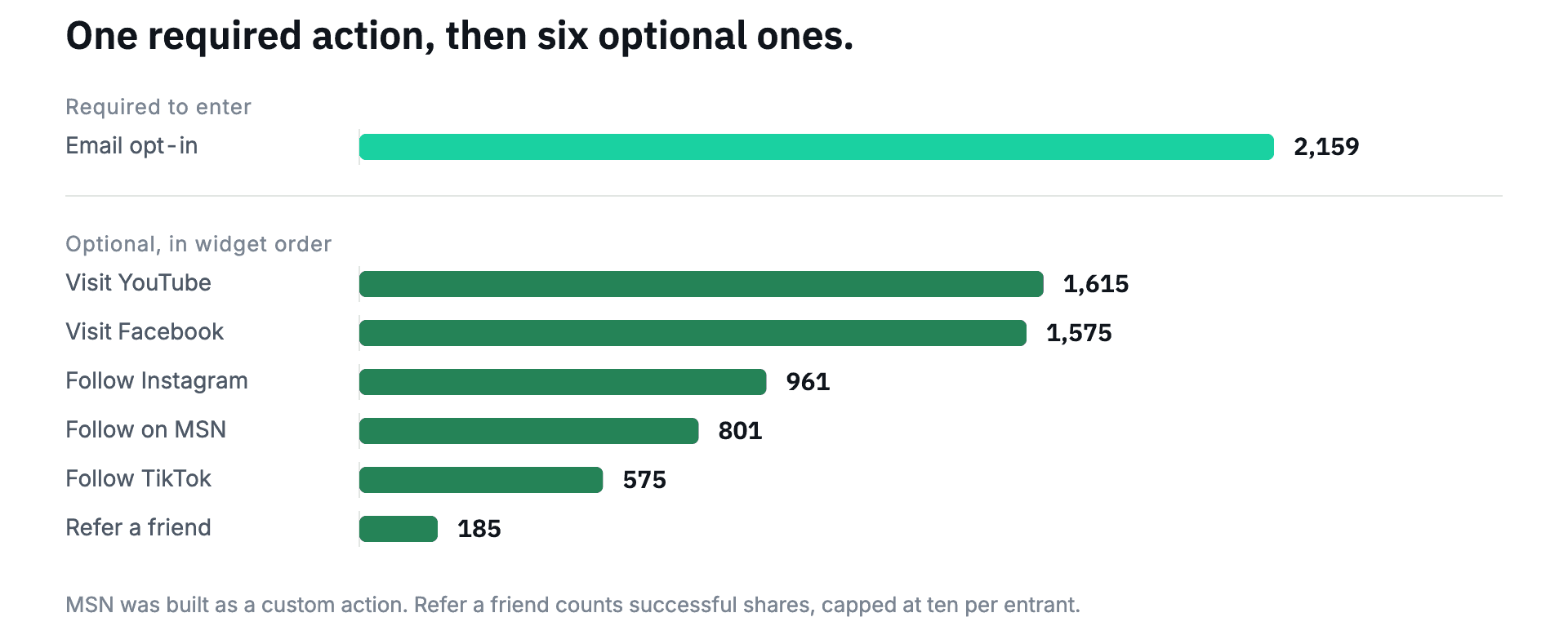
The widget had seven Actions, one of them required. The order went consent first, channel engagement second and sharing last. Here's each one in widget order, with its completions:
Enter for your chance to win (required email opt-in): 2,159
Instagram Follow: 961
TikTok Follow: 575
Visit on YouTube: 1,615
Visit on Facebook: 1,575
Follow on MSN: 801, built as a Gleam custom Action because there's no native one
Refer up to 10 friends (Viral Share): 185 successful shares, capped at ten shares per Entrant
The required Action was the floor. 2,177 Entrants completed 7,871 Actions, 3.6 each, and everything after the opt-in was voluntary, from people who already knew what the prize was and wanted it.
Put the Strongest Optional Actions First
The two visit Actions drew the most optional completions, YouTube with 1,615 and Facebook with 1,575. Instagram Follow sat first among the optional Actions and drew 961. Work out which optional Actions matter most for your goals, and which your audience completes most, and put those at the top.
Treat the rest as supporting Actions, and give the Viral Share Action a higher entry value than the others to make it worth doing.
If you want Entrants to complete every Action, add a Bonus Action. Count the Actions before it, set that as the number required, and give extra entries to everyone who completes them all.
1,075 Clicks, 185 Shares, 94 People
A referral Action brings in people your Entrants know and you don't. The "Refer up to 10 friends" Action drew 1,075 clicks and 185 successful shares, a 17.21% Viral Conversion (185 of 1,075).
94 Entrants (4.3% of 2,177) made those 185 shares, and five of them hit the ten-share cap on their own. The shares came from a small group, so build the incentive to reward the tenth share rather than counting on everyone to make a first one.
Where the 4,998 Impressions Came From
Techlicious's own blog post and the Gleam-hosted entry page it set up brought 3,365 of the 4,998 Impressions (67%) and 4,400 of the 7,871 Actions. Two pages the team runs itself carried most of the campaign, because the readers were already there.
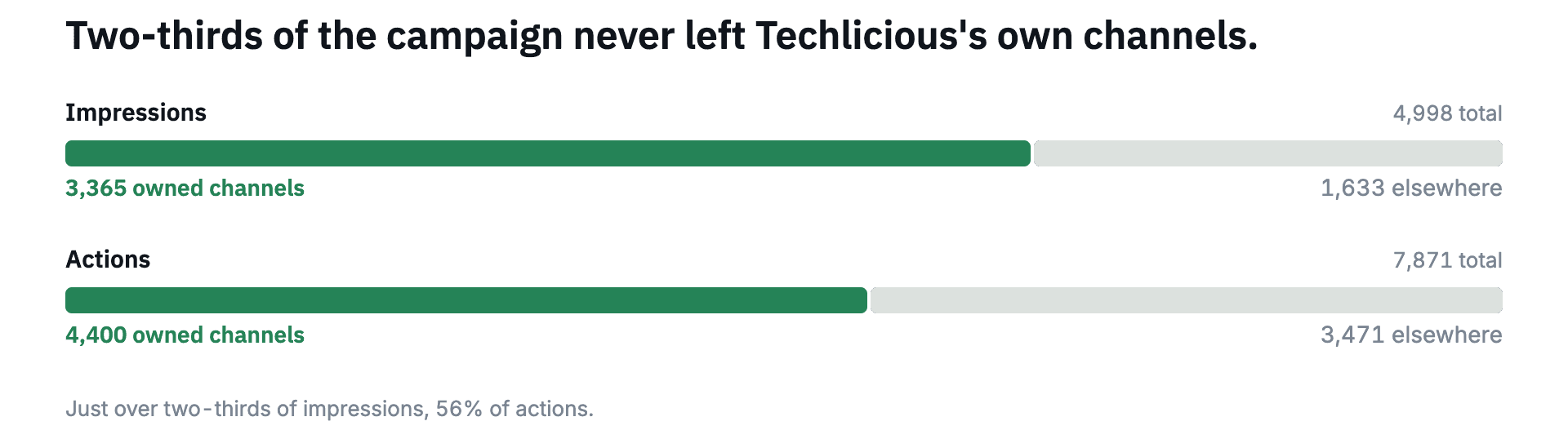
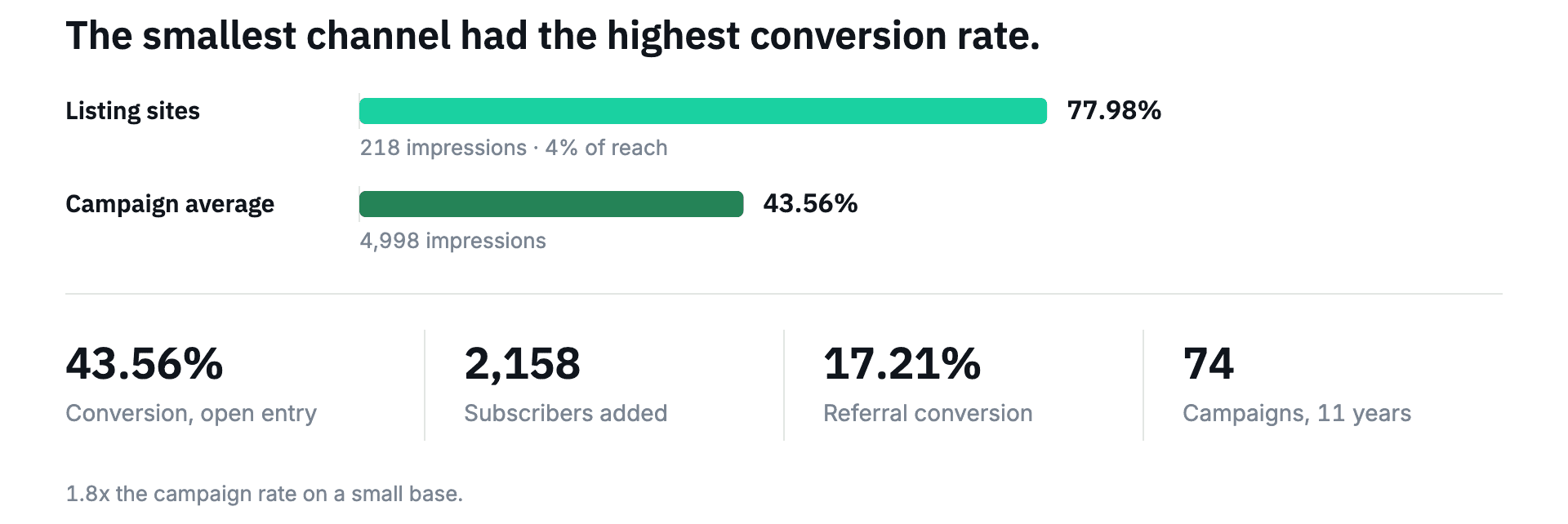
Giveaway listing sites brought 218 Impressions (4.4% of 4,998) and converted at 77.98%, about 170 Entrants, against 43.56% for the campaign. That's a small base, so treat listing sites as something to test. Judge them on Impressions alone and you'll underrate them.
Day Nine Beat Launch Day
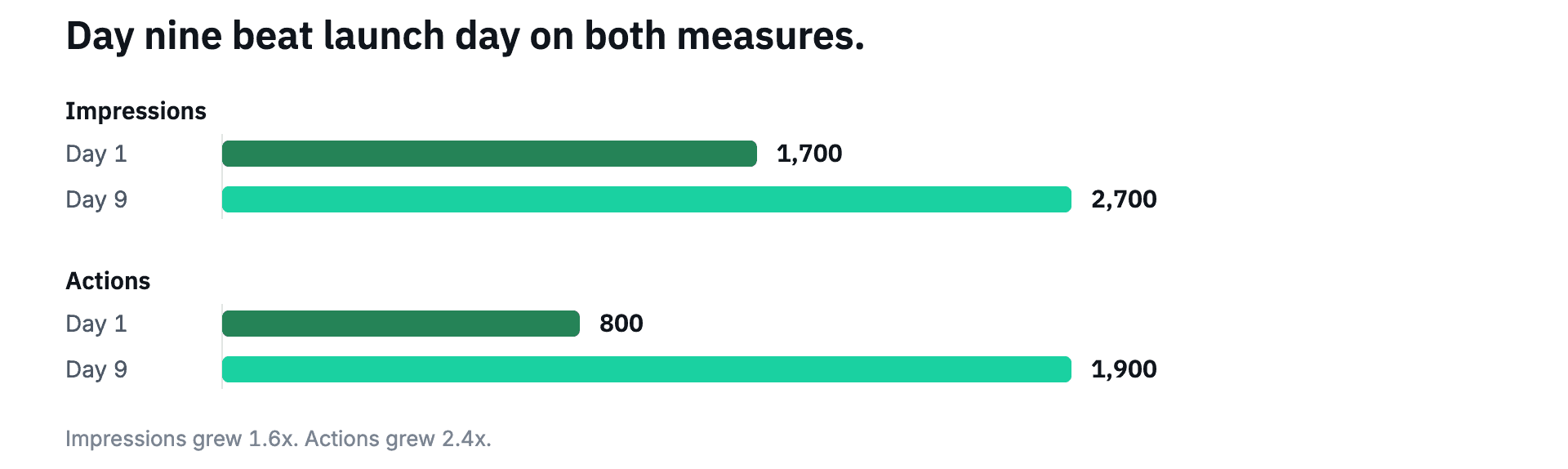
Impressions didn't peak on launch day. The highest single day for both Impressions and Actions was day nine, most of the way through the 13-day run, before the campaign tapered to zero at close.
Most giveaways peak in their first days. Keep promoting past that, and add extra Actions later in the run so Entrants can come back and multiply their entries.
Before the giveaway closes, post a reminder on your social channels or a banner on your site so Entrants know it's about to end.
Key Growth Takeaways
So what can you take from Techlicious's Chromebook giveaway?
Pick a prize your readers already research. The $599.99 Chromebook matched Techlicious's Family and Parenting coverage, and 43.56% of the 4,998 people who saw the widget entered. Choose a prize at the price your readers shop at, from a category you already cover.
Make the email opt-in the only required Action. Techlicious required one Action, and 2,159 of 2,177 Entrants completed it. Connect the Mailchimp integration before launch and test one entry end to end.
Put the referral last and cap it. Techlicious capped referrals at ten shares, and 94 Entrants made all 185 shares. Place the referral Action last and give it a higher entry value than the rest.
Promote from your own pages first. Techlicious's blog post and hosted entry page brought 3,365 of the 4,998 Impressions. Publish your article with the widget embedded, then test listing sites, which converted at 77.98% off 218 Impressions.
Keep promoting past launch day. The best day for Impressions and Actions was day nine of the 13. Plan a second push mid-run and post a reminder before the giveaway closes.
74 Campaigns in 11 Years
Techlicious has run 74 Gleam campaigns in 11 years, and it reuses the same setup. A prize drawn from topics the site already covers, one mandatory email Action, a set of optional social Actions, a capped referral and a Mailchimp sync, so every campaign adds to the same list. Gleam's Playbooks cover the same build.
Start from a competition template, connect Mailchimp, and put the email opt-in Action at the front of your widget. Then use the Playbooks to pick the optional Actions your audience will actually complete. Start a giveaway free or use the Email List Giveaway template.
About these numbers: figures come from Gleam's report for this 13-day campaign, which ended June 14, 2025. Conversion Rate is Entrants divided by 4,998 Impressions.




Want to Be Featured?
Are you satisfied with your Gleam experience? Share a testimonial with us:
Inspired by this Case Study?
Sign up now and run your first giveaway:
Or
